Seamless login
Integration schema
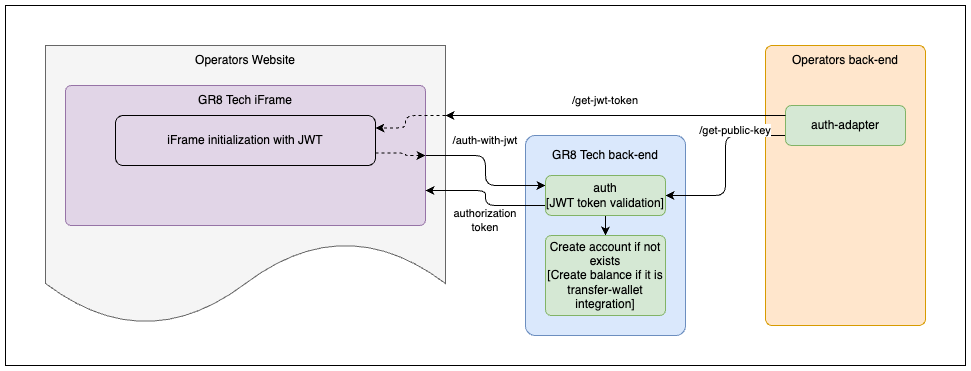
Integration
The client must implement the next endpoints on the side of their platform to guarantee the correct work of a seamless login mechanism:
- get-jwt-token
- get-public-key
Note
Player account and balance will be created in our system during the first authorized player entrance to the iFrame.
Warning
Player account and balance will be created with using the currency which were provided in JWT token at first time. Player account currency can't be changed.
Sportsbook iFrame will show an error and will not authorize player in case when the currency in JWT token is not equal to the account currency.
get-jwt-token
This endpoint must be used by clients FE for further iFrame initialization.
The client can implement this endpoint and use any URL for it.
The endpoint will not be in use of the Sportsbook iFrame solution.
Note
There is no need to receive and post jwt-token in a case when the end-user is not authorized on the client platform.
[GET] /api/v1/auth/get-jwt-token
{
  "token": "eyJhbGciOiJSUzI1NiIsInR5cCI6IkpXVCJ9.eyJleHRlcm5hbFVzZXJJZCI6ImVlZGU5ODhmNTI3MzQzMTJhOTliNDJmNDExNGEyZWQzIiwiZGVmYXVsdEN1cnJlbmN5IjoiVVNEIn0.2hR8Zfoit0cGC9fXgI1NeHP-HxMky526KNONdF1WOo_dFJujZggDWqcgacycQBUaEZWxsBpaLYi1I9RQrF8F6ZYodRS9ACpIue-2Gl505cKJ1DcjHXfRt-883IwS2DZL-3mmxgxC-8xdqzKeNC-nBXUrg5NBGyeBMv-ZbvFgK1kQy_iM5DvUgPj3ZLiCb9uaP9NcnavCm4YBeIU60KvsOTcRDUIASIw0D-iB3KuuCJIdDc1b4UeiYI_rOjphv4w2AwVTYmzqIh0mg9UlfF3zBjgh96tlchnUwZx-UJ1rbf6SxFxvAtZT5zdhlEeEiLvTTm0okZNtBiltEdkkXULrHQ"
}
JWT-token is used for remote authentication on the Sportsbook iFrame. JWT-token should be sent to iFrame in src
Note
It is only a request implementation example and every operator can implement it on its own.
JWT structure
{
    "defaultCurrency":"<playerCurrency>",
    "externalUserId": "<playerId>",
    "iat": 1516239022,
    "exp": 1516539022,
    "operatorUserId": "<operatorUserId>",   // Optional field
    "operatorUserName": "<operatorUserName>", // Optional field
    "country": "<registrationPlayerCountryIso3>" // Optional field
}
{
    "externalUserId": "70bd9c7d-a138-4c0a-8d89-7982eb88ee77",
    "defaultCurrency": "USD",
    "iat": 1738179776,
    "exp": 1738266176,
    "operatorUserId": "userId-23",
    "operatorUserName": "customUserName",
    "country": "GBR" // ISO-3 format. Optional field
}
Warning
The max supported length of playerId is 36 symbols. In case you have a GR8Tech Casino aggregation, the max supported length of playerId is 20 symbols. Allowed characters: Latin letters (A-Z, a-z), numbers (0-9), and hyphen (-). Regex: ^([A-Za-z0-9-]{1,36})$
JWT payload fields
| Field | Required | Description |
|---|---|---|
externalUserId | Yes | Id of player account. This Id will be used for account creation and can't be changed in the future. Max length: 36 symbols. Allowed characters: Latin letters (A-Z, a-z), numbers (0-9), and hyphen (-). Regex: ^([A-Za-z0-9-]{1,36})$ |
defaultCurrency | Yes | Currency which player uses for betting. This currency will be used for account creation and can't be changed in the future. The supported currencies list is described in the "General integration info" section. |
iat | Yes | (issued at) Timestamp that indicates the time at which the JWT was issued. The value of this claim is Epoch time in seconds. Must be a NumericDate value |
exp | No | (expiration time) Time after which the JWT expires. The value of this claim is Epoch time in seconds. Default value: iat + 30 seconds. Must be a NumericDate value |
country | No | Player's registration country in ISO-3 format. Used for compliance and regional settings. |
operatorUserId | No | Real user ID from the client's platform. Used for search and display in the Players list in UBO. |
operatorUserName | No | Real username from the client's platform. Used for search and display in the Players list in UBO. |
Important: Fields that can only be set during account creation
The following fields can only be set during the first player entrance to the iFrame (during account creation):
- country
- operatorUserId
- operatorUserName
If these fields are not provided during the initial login, subsequent attempts to add or update them via JWT token will not change the player's values. To update these fields later, you must use the S2S Player Profile API.
JWT signature verification
JWT.verify-signature = RSASHA256(base64.Encode(JWT.header) + "." + base64.Encode(JWT.payload))
Note
The public key for RSASHA256 must be provided by a client. The client's responsibility is to provide a private secure endpoint (IP whitelisting) that responds with the public key that GR8 Tech Platform will use for verifying the JWT signature.
get-public-key
This endpoint must be used by the Sportsbook iFrame for further iFrame JWT signature verification.
The client can implement this endpoint and use any URL for it.
Client needs to notify GR8 Tech about the URL of this endpoint for future configuration as it will be used by Sportsbook iFrame on the backend side.
This endpoint must be hidden with an IP-whitelisting mechanism. Ask the GR8 Tech team for their IP addresses to whitelist them.
This endpoint response will be cached on the Sportsbook iFrame side for 15 minutes. The sportsbook iframe will be unavailable for players for 15 minutes in case of public key rotation.
Note
The operator must provide different URLs per tenant for these endpoints if he has a few Sportsbook iFrame brands/tenants or build different logic depending on the X-Brand and X-Operator-Id headers.
Danger
After generated DO NOT MODIFY PUBLIC KEY. Just leave as it is
[GET] /api/v1/sportsbook-iframe/auth/keys/get-public-key
-----BEGIN PUBLIC KEY-----
MIIBIjANBgkqhkiG9w0BAQEFAAOCAQ8AMIIBCgKCAQEAy2LAhwUOIss8UdNogG5g
KY6ijQUtnrlTohaSvGKg9RkR0BmOQGZMbRlK093VWtW8DM3qALItEQK+FmFazXHY
nvlnONikHaXf1o+7nDKJtAZRPvS5BXMvrjdf5HJL74XYo3Bt845HARHobnHK6q9F
HeRXcGt6rcR9N3dl3o/r0uRxOmz5IF8q1Mt/LJyqCp0UmhRwRbtmjOGTE3wrMPkq
TDflnhy3YyZf9wcllNsFYgIRXjLcoWnHQf4ydSsJwcma8mp2MCGY4c4DtzpuoDw2
JinDx8MM878q+qLdsAw3WUAX2ih5guFdoBx3kDYctfOuEzN4KbkzVO5Agl15GSed
/QIDAQAB
-----END PUBLIC KEY-----
Private and public keys can be generated using the bash command: