Event monitor description
1. DESCRIPTION OF THE EVENT MONITOR
1.1 Purpose of the event monitor
"Event monitor" is a module intended for monitoring and management of bets and settlements on them in different grouped sections, depending on the required level of detail.
This section allows managers to quickly and efficiently find out the full information about sports events on which to make at least one bet for the selected period.
1.2 Potential users of "Event monitor"
-
1. Head of the brand
-
2. Head of department (department of calculation, monitoring, trading)
-
3. Settlement Operator
-
4. Antifraud operator
-
5. Trader (trader live, prematch and event feed)
1.3 The information available in "Event monitor"
The structural components can be conventionally divided into 4 main logic blocks:
-
1. The tree structure of events for navigation:
-
° Sport
-
° Tournament
-
° Category
-
° Event
-
-
2. The aggregated information for the selected level (available only for "event-monitor-aggregations-data-view" roles)
-
3. The information about selected event with a list of markets and outcomes on which bets were placed within this event
-
4. The information about bets by selected markets and outcomes
2. FUNCTIONALITIES OF THE EVENT MONITOR
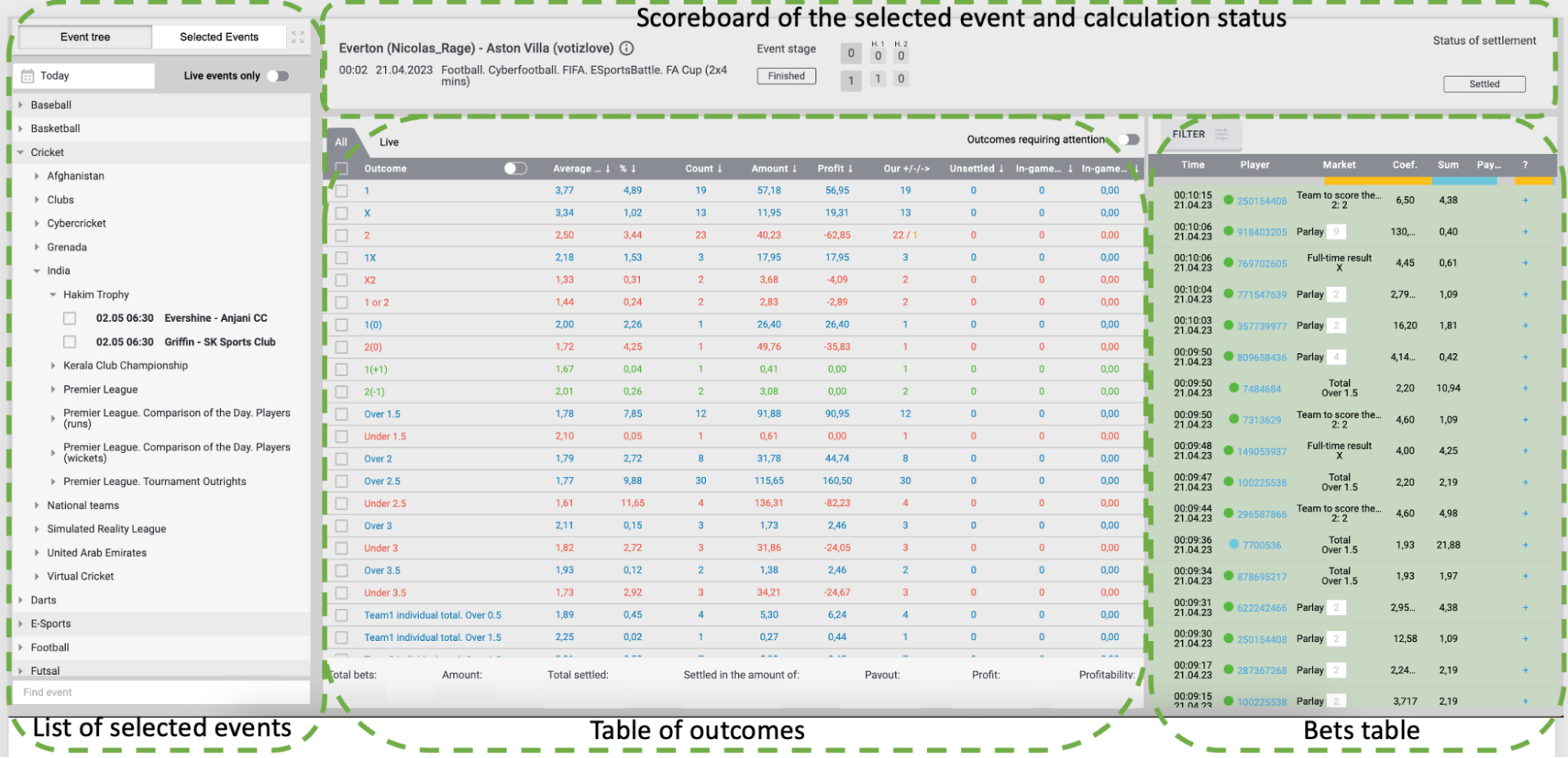
2.1 List of events
The are two options how to find event in tree:
-
• Discover thru tree and when event finder - double click on it
-
• Use search
2.2 Table of outcomes
Outcome - the name of the outcome (Victory1, Handicap, etc.). Using the switch in the table header, you can switch between the full and abbreviated names.
Wed coefficient - information about the average coefficient.
% - data on the percentage ratio of the number of accepted bets on the outcome to the total number of accepted bets in the event.
Amount - the total amount of bets accepted on the outcome, in the base currency of the bookmaker.
Profit - the total amount of profit / loss on the outcome in the base currency. Profit is displayed using a blue fill color, loss is displayed using a red fill color and a minus sign.
+/-/-> contains information about the number of bets, the calculation of which brought a profit, loss or return on bets:
loss - red font.
profit - blue font.
returned - black font.
A Cash Out (a feature that allows a player to settle a bet before the result is known) can also be shown.
Unsettled - information about the number of unsettled bets in the outcome.
Number of bets in the game - information about the number of bets in the outcome that are still in the game.
Amount of bets in the game - information about the amount of all bets in the outcome that are still in the game.
2.2 Bets table
Time - date and time when the bet was accepted
Player - indicator of player segment and player ID. Player segment indicator and player ID. The color of the player ID reflects the player's characteristics regarding the style of play in the Betting Company (red - the player wins from the bookmaker, blue - the player loses the Betting Company, black - the player's profit is 0, usually given to new players who have not yet placed bets). When you click LMB on a player ID, a player card opens in a new tab.)
Market - the name of the market on which the bet is placed
Coef. - rate coefficient
Amount - bet amount
? - sign of rate calculation. Legend:
+ - losing bet (the player lost, the bookmaker won);
- - the bet is winning for the player;
? - the result is not yet known, the bet has not been calculated;
= - return, the outcome is calculated by the coefficient 1;
T= - technical return, the outcome is calculated by the coefficient 1
 - cashout
Payout - the amount to be paid, is displayed only after the calculation of the bet.
2.4 Scoreboard and statuses
On the top of event displayed dedicated scoreboard for each sport with actual information about:
-
• Start time of event
-
• Live or final score in event (with periods)
-
• Event status
-
° Not started
-
° In play
-
° Finished
-
° Abandoned
-
-
• Settlement status
-
° Unsettled - there are no settled bets in event
-
° Semi settled - at least one bet in event settled
-
° Settled - all bets in event settled
-