Feed Custimization
Introduction
Customization functionality covers possibility of provided trading line configuration (feed customization) based on Client's needs.
Allows user:
- to create customization templates for tournaments and events (pre-defaulted templates for each sport and each trading stage will be provided as part of solution, and could be modified by user decision)
- to configure different customization for different brands separately
- to create separate customization settings, depending by trading stage (In-play and Prematch)
Customization includes following features:
- markets customization: defining list of markets to be received in feed
- margin customization: installing different margin rates for different markets, events, tournaments and sports
- limits customization: setting up limit for maximum win (liability limit)
- delay customization: setting up delays for bets accepting for In-play trading
Data available for customization
To adopt trading line for business needs of the client - following parameters could be configured by user's decision.
Installed settings will be applied to feed, provided to operator.
Markets
User could define list of markets (related to periods), that he wants to receive in feed for:
- - for specific sport / tournament / event
- - for each brand separately (if needed)
- - for trading stage (In-play, Prematch)
This will allow flexible management of the feed, not getting the whole trading line.
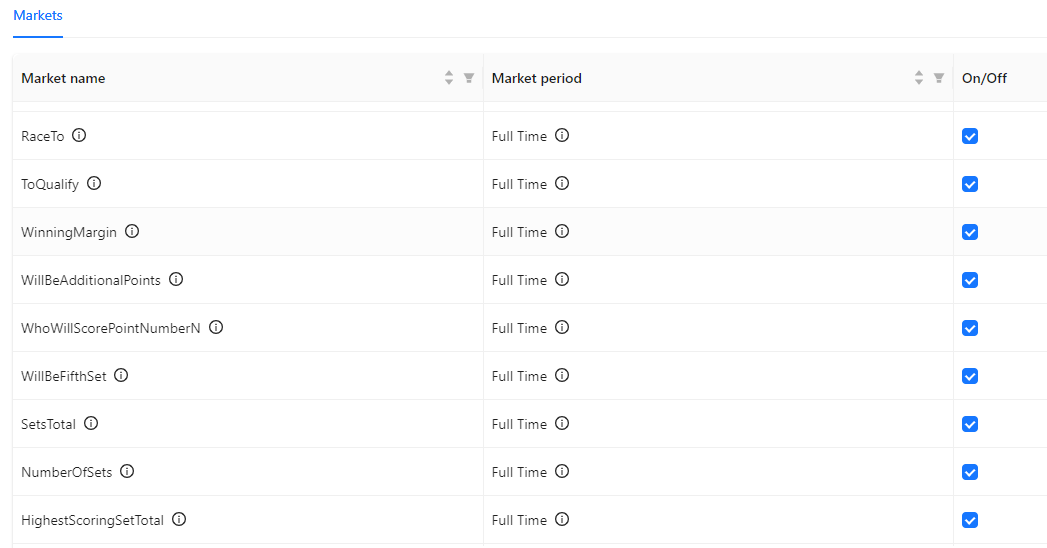
Tab 'Markets" of customization template contains list of markets with periods, available for chosen sport, brand and trading stage.
User sets parameter "On/Off" in separate column in from of each market to include/exclude this market to be provided to feed.
By default - all markets are On, and user can change it (changes will apply after pressing "Save" button). Means, market with parameter "On/Off" = true will be provided to client in trading data, and market with parameter "On/Off" = false - will not. By default all markets are marked as "On".
There is option to check / uncheck all markets in list - by separate button "Check / Uncheck all markets"
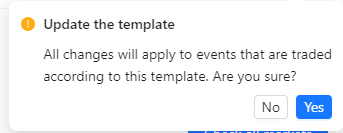
All changes to customization settings are request by system to be confirmed by user upon saving.
Margin
Provides possibility to set up wished margin rate (in %) for each market at level of sport / tournament / event and brand-wise, and for each trading stage (In-play, Prematch) independently.
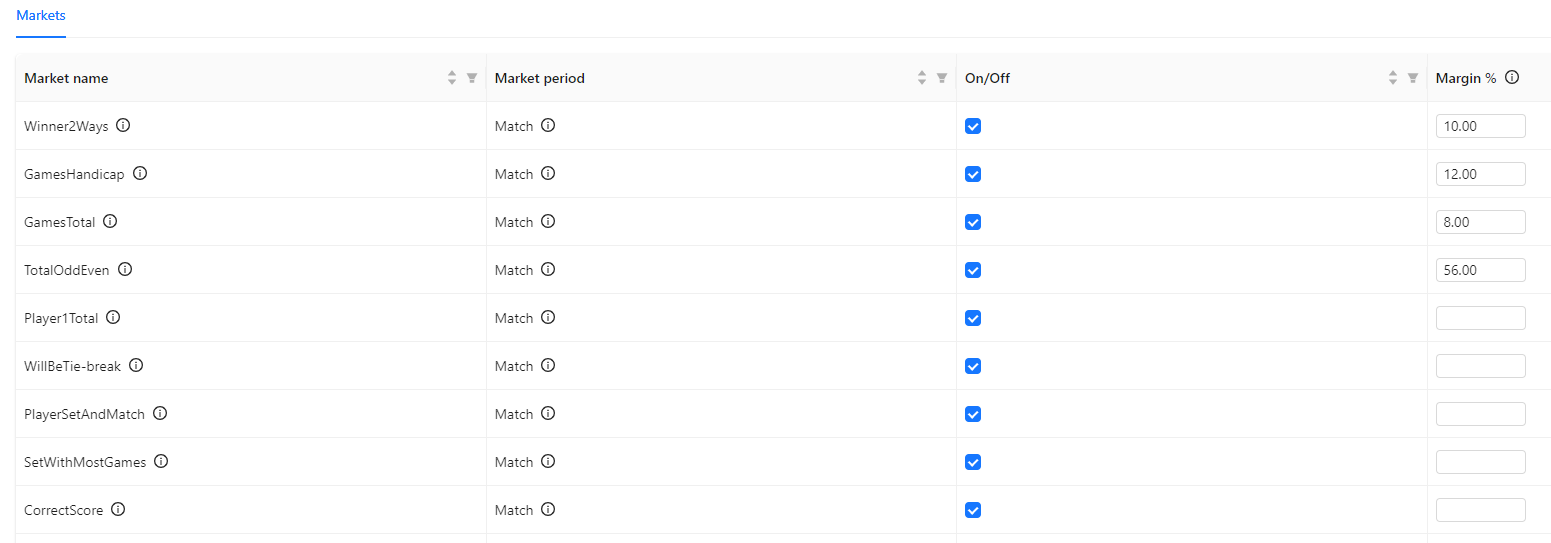
User sets up desired margin rate (in %) in separate column "Margin" in from of each market, presses "Save" and confirms template's changes. Available values from 0 to 60.
According to new margin installed, odds prices will be recalculated for chosen markets. Means, for markets, which have parameter "On/Off" = true - feed will include data considering wished margin rate settings.
Based on new wished margin (installed by user), odds multipliers will be calculated, and provided to client in feed altogether with "basic" odds. In order to have final odds prices it's needed to multiply base odds from feed to odd multiplier from feed. Final odds to be used for bets accepting on client's side should be calculated by formula:
Odd_final (to be calculated on client's side) = Odd_basic (provided by feed) * Odd_muliplyer (provided by feed)
In the same time, for user's convenience, Event View displays markets with already calculated final odds, affected by installed wished margin.
Limits
Provides possibility to set up limit for winning (liability limit) for each market (depending on brand and trading stage).
User sets up limit value (in base currency) in separate column "Limit" in from of each market, presses "Save" and confirms template's changes.
Installed limit will be applied for chosen markets. Means, for markets, which have parameter "On/Off" = true - feed will include data about limit's settings, installed by client.
If limits are not set up by user in Console at Customization module - there should be applied defaulted limits incorporated in trading feed.
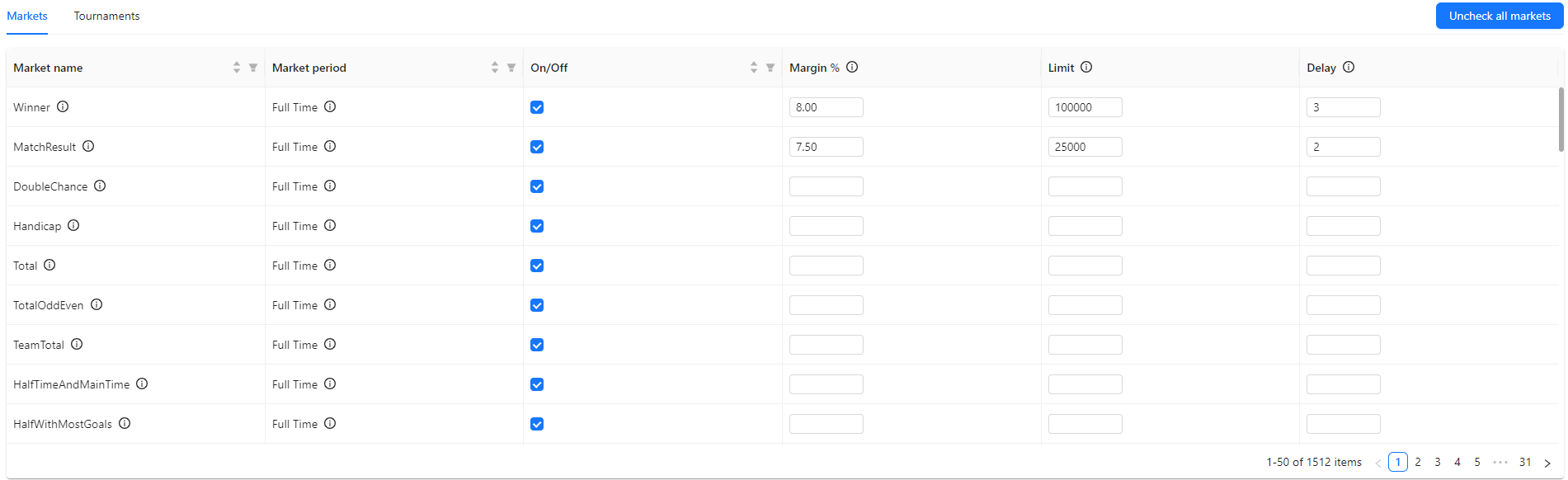
Delays
Provides possibility to set up delay for bet acceptance for In-play trading.
User sets up delay value (in seconds) in separate column "Delay" in from of each market, presses "Save" and confirms template's changes.
Installed delay will be applied for chosen markets. Means, for markets, which have parameter "On/Off" = true - feed will include data about limit's settings, installed by client.
If delays are not set up by user in Console at Customization module - there should be applied defaulted delays incorporated in trading feed.
Customization templates types
Set up customized parameters (list of markets, margin, limit and delay) is done via creation of customization template.
Customization functionality is located at separate console's tab "Customization". Contains configuration of 3 customization template's types: sport's templates, tournament's templates, event's templates.
Each template type could be configured:
- per client's brand(s) separately (if necessary).
- per trading stage (In-play, Prematch). If client operates only at one brand - the only brand could be used for templates creation.
Customization settings could be created for each client's brand separately and for each trading stage independently (In-play and Prematch).
Configuration could apply on the level of sport (for events of all tournaments of this sport), on the tournament level (to events of this tournament) and to specific event (events).
Thus, 3 customization template types are available for user:
- Sport templates
- Tournament templates
- Event templates
List of templates of each type is available on separate tab "Customization": "Sport templates", "Tournament templates", "Event templates" - which are described in chapters below.
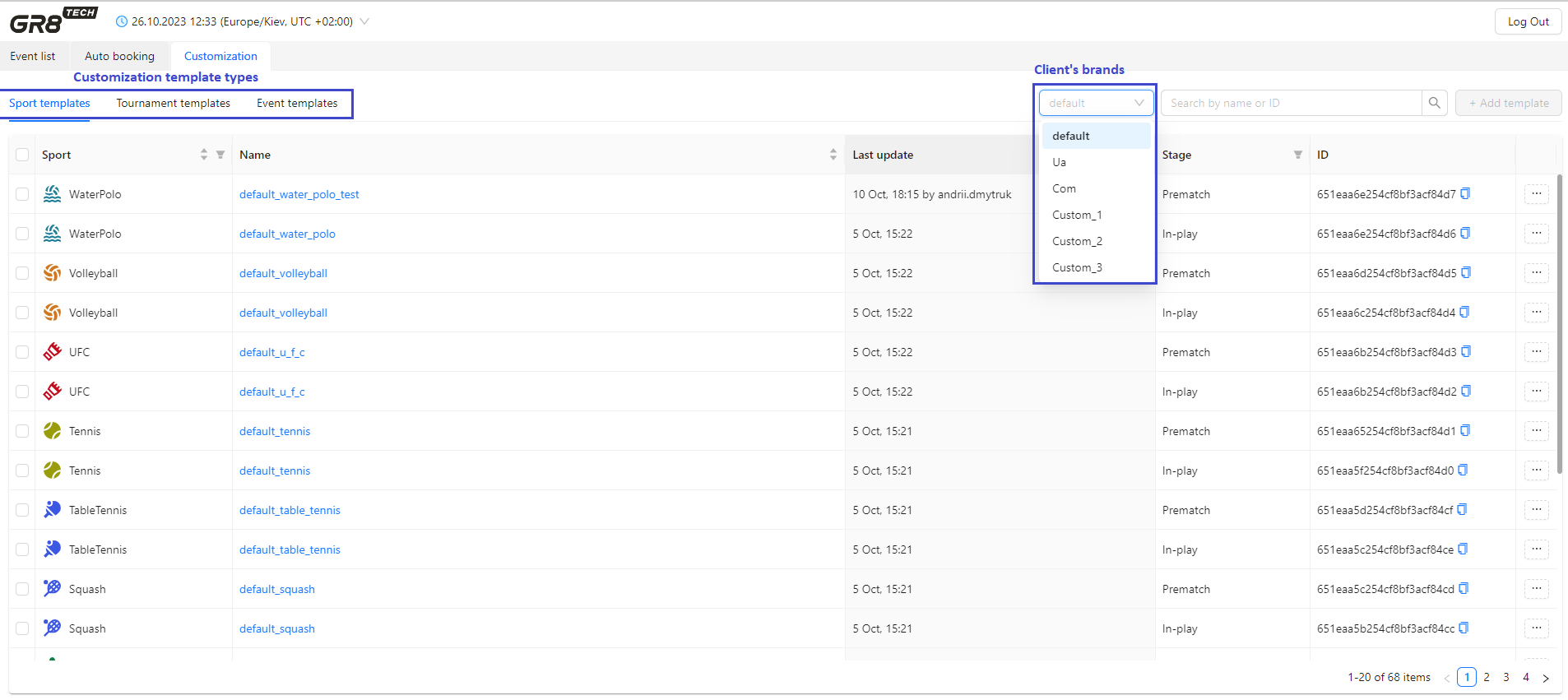
By clicking on template's name user gets into template view: so can see details of each template or modify customization parameters (with user's confirmation for changes while template's saving).
Also template's details are available after pressing "Details" in context menu, invoked by button "..." in front of each template.
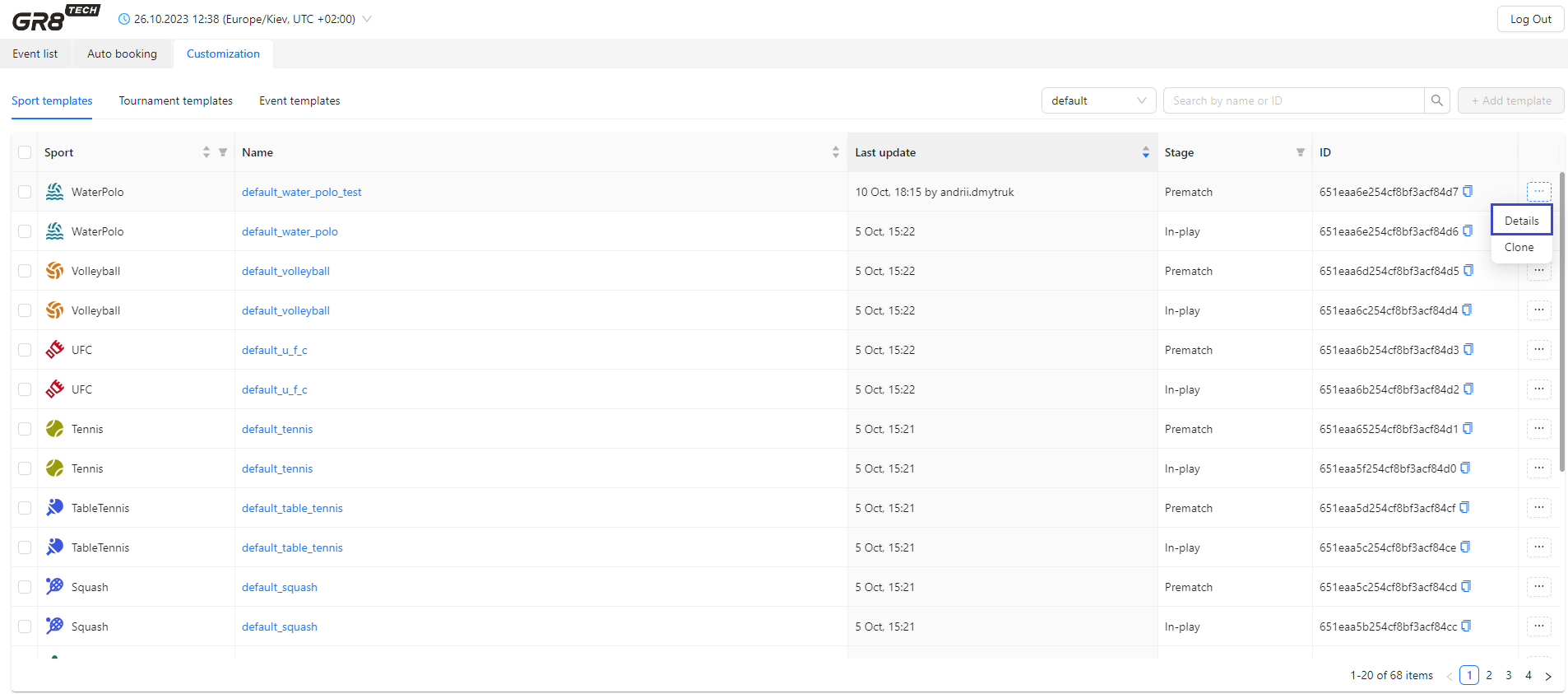
Templates could be created:
- in advance (for future events and tournaments) - and settings of this template will apply for all new appeared events satisfying template's conditions
- for existing events (Prematch and In-play)
Sport templates
Are available at tab "Sport templates" of Customization.
Sport templates could be used, if customization is needed for all events of all tournaments of chosen sport.
Tab contains list of sport's templates:
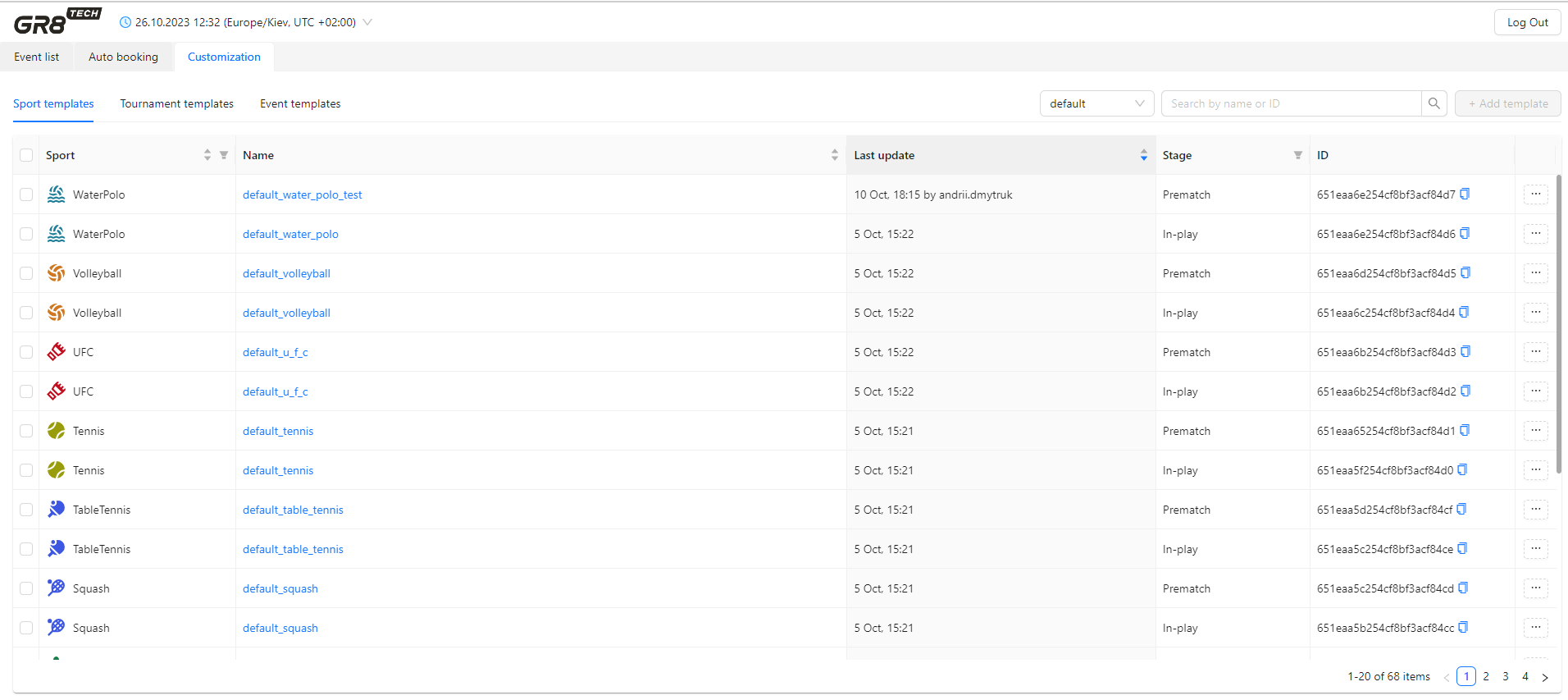
Template view of Sport's template:
Includes info about template name, sport, brand, trading stage and date of the last update.
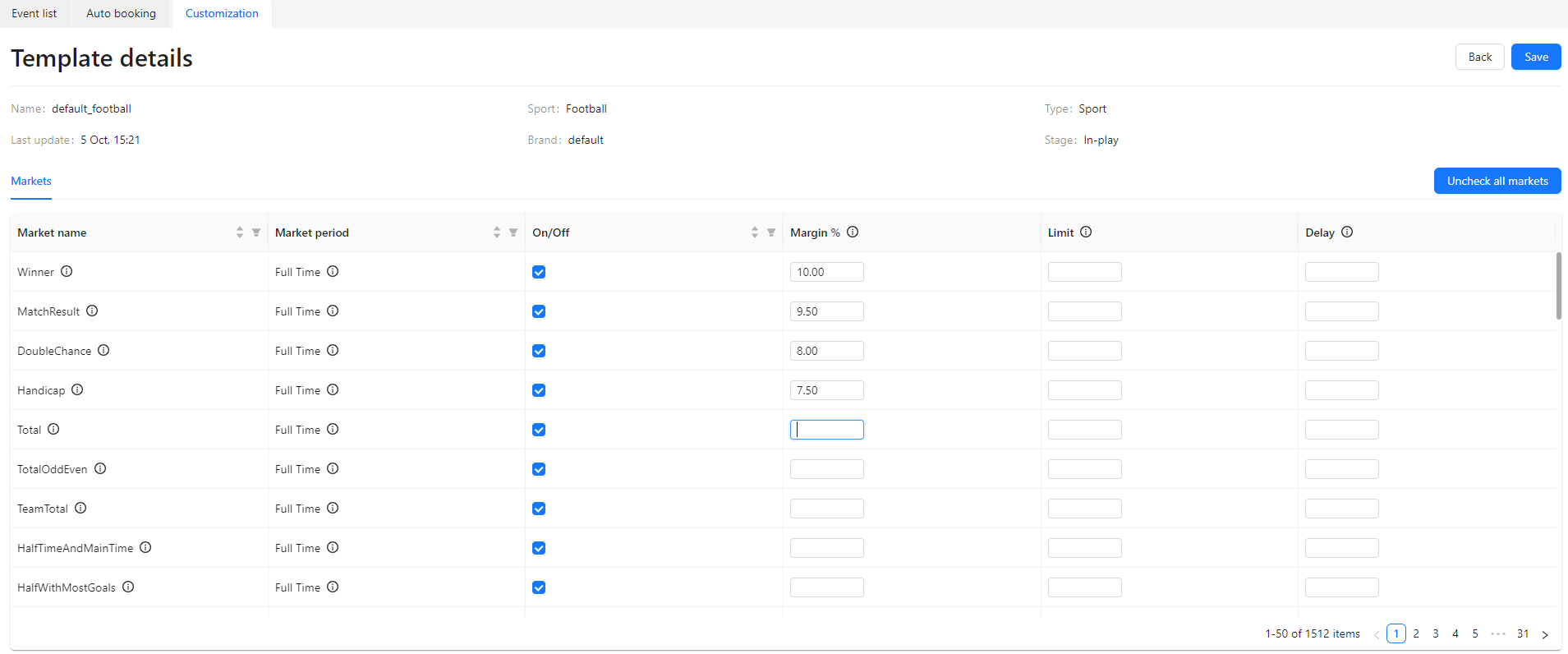
Templates for each sport for defaulted brand for stages Prematch and In-play are already provided in scope of customization functionality - with predefined standard settings (to optimize user's resources for customization handling). In the same time, user is allowed to modify template's parameters.
For this purpose at tab "Markets" of sport's template list of markets, values of margin, delays, limits - could be set according to user's decision (details in chapter "Data available for customization").
Settings of sport's template are applied to all events of all tournaments of this sport for mentioned brand and for chosen trading stage - if there are no other higher-priority templates, applied to tournaments / events according to business rules ("Templates prioritization" chapter).
Also for user's convenience, if there are several brands to operate - there is option to customize each brand separately by cloning defaulted sport customization templates to other brands.
For this purpose:
1) to tick provided sport templates (for defaulted brands) - which has to be cloned to other brands. Cloning could be done either for 1 template, or for list of templates
2) to chose option "Clone" in context menu (for cloning of 1 chosen template)
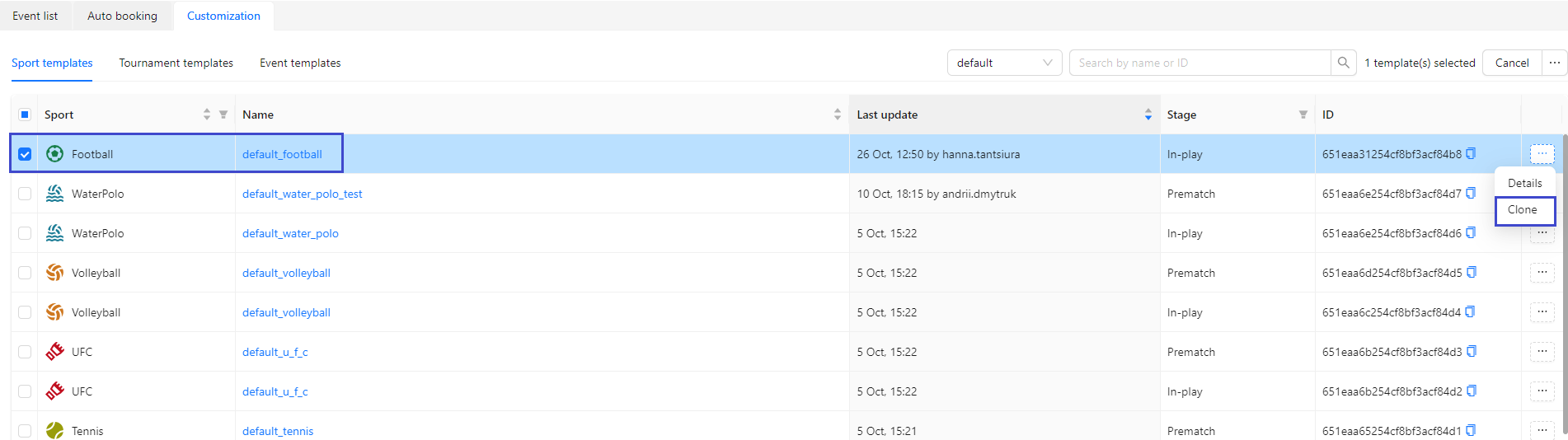
or right-up-corner menu for bulk cloning (cloning of the all chosen templates):
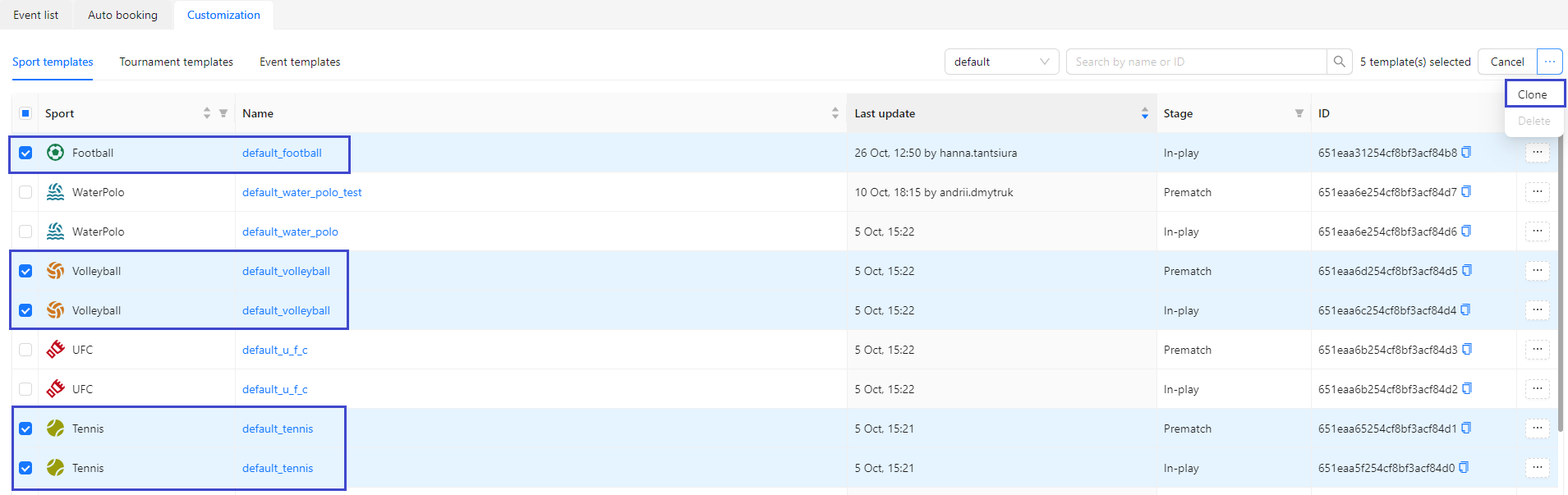
3) to chose brand, to which template has to be cloned
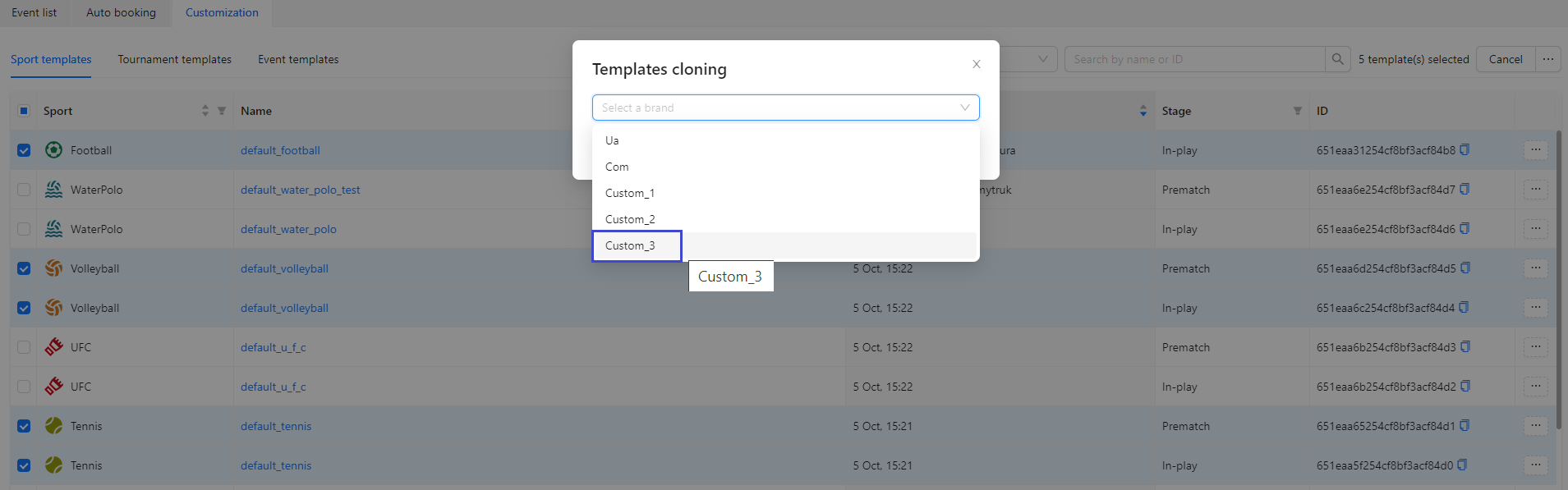
4) after system confirmation that cloning was successfully fulfilled - to change templates parameters for new brand: margins, limits, delays (if necessary). This could be done at Template View as described above in "Data, available for customization"
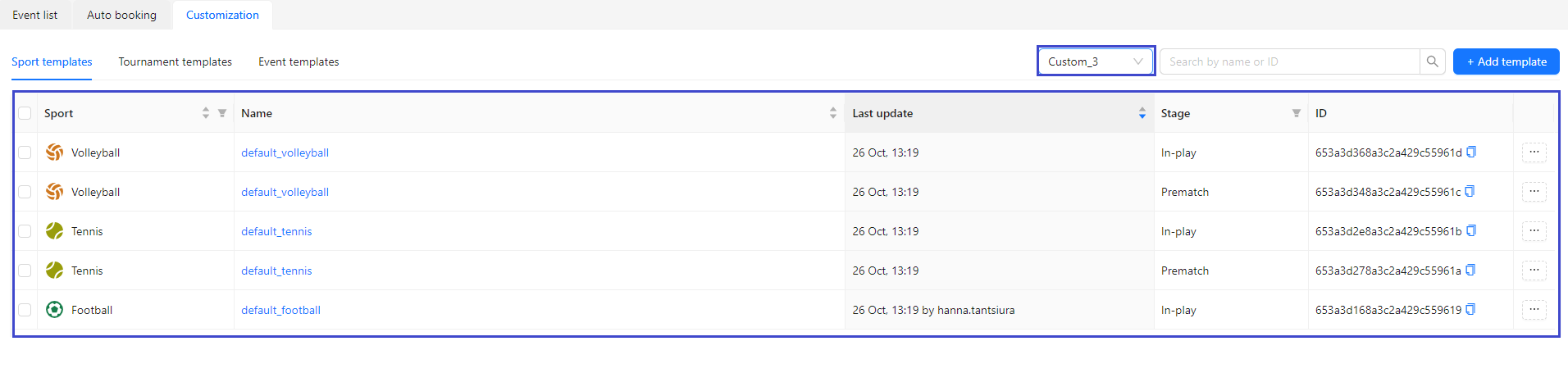
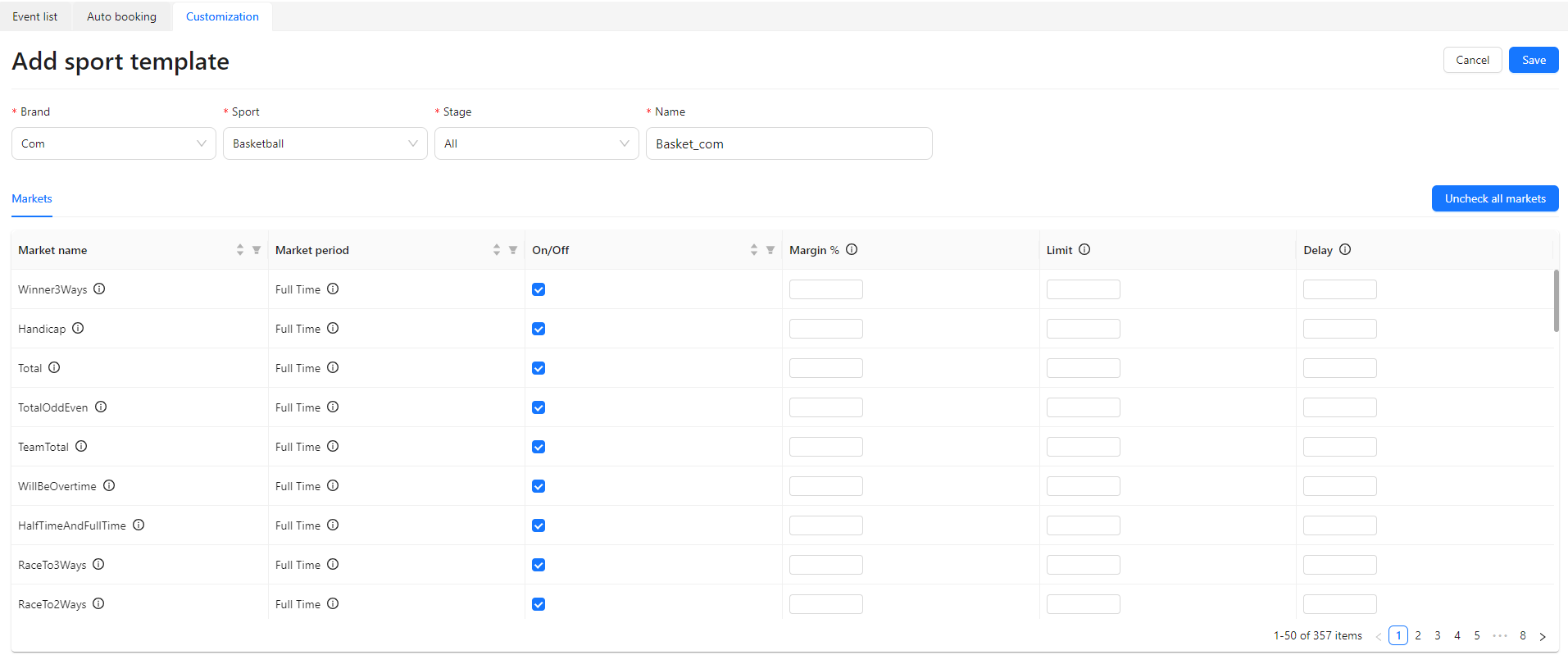
Also user can create sport templates (for all brands, except default) without cloning, by pressing button "Add template".
User should set brand (from list), sport, trading stage (In-play, Prematch, All) and define template's name.
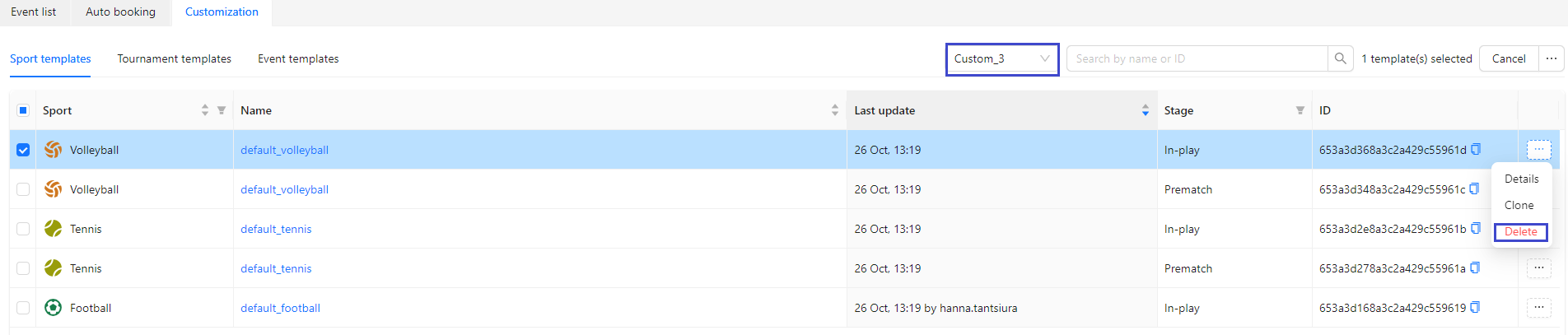
Sport templates for all brands, except default, could be deleted from context menu:
Tournament templates
Are available at tab "Tournament templates" of Customization.
Tournament templates could be used, if customization is needed for all events of this tournament.
Tab contains list of tournament's templates per chosen brand, specifying sport, list of tournaments to be applied and needed trading stage.
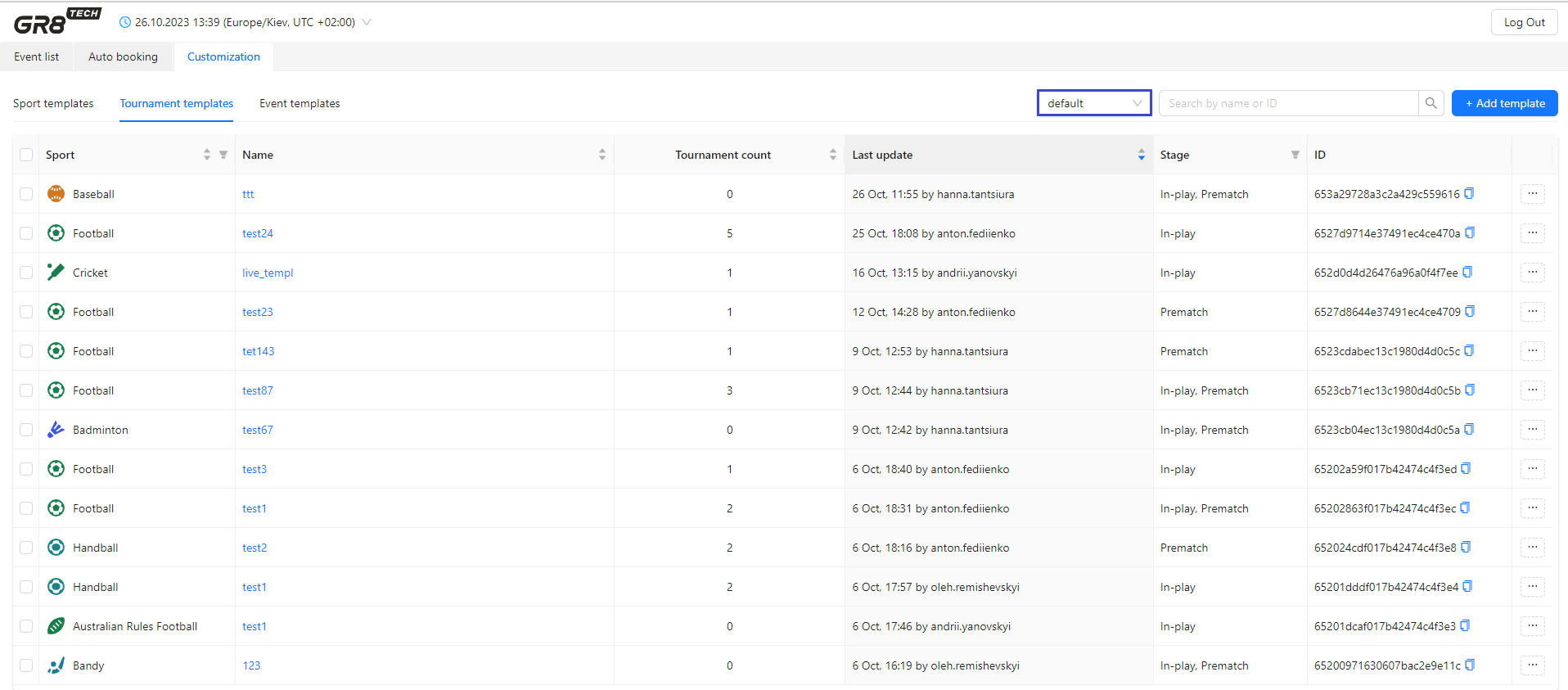
To create new tournament's template user should press "Add template" button and enter brand (from list), sport, trading stage (In-play, Prematch, All) and name of template (it should be unique for combination sport + brand).
After that user sets up customization settings (list of markets, margin, delays, limits) at tab "Markets".
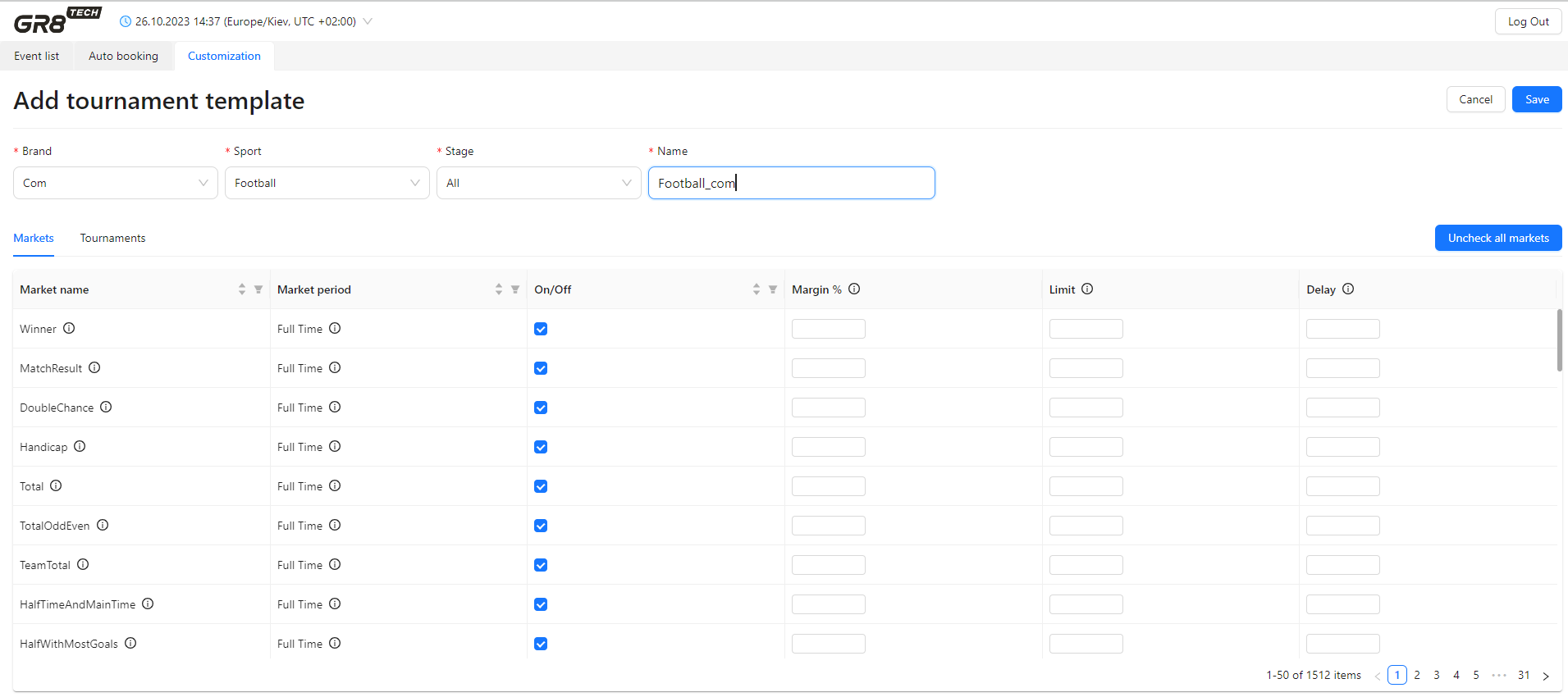
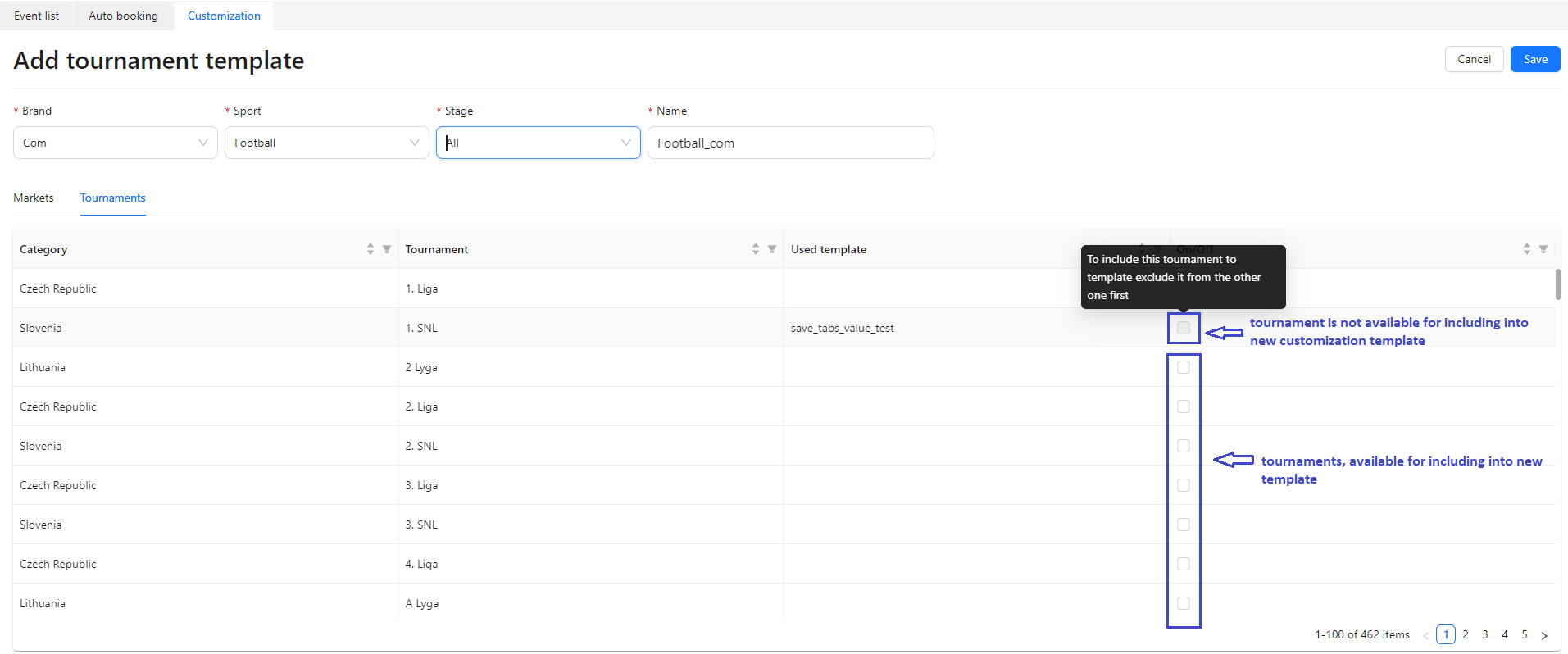
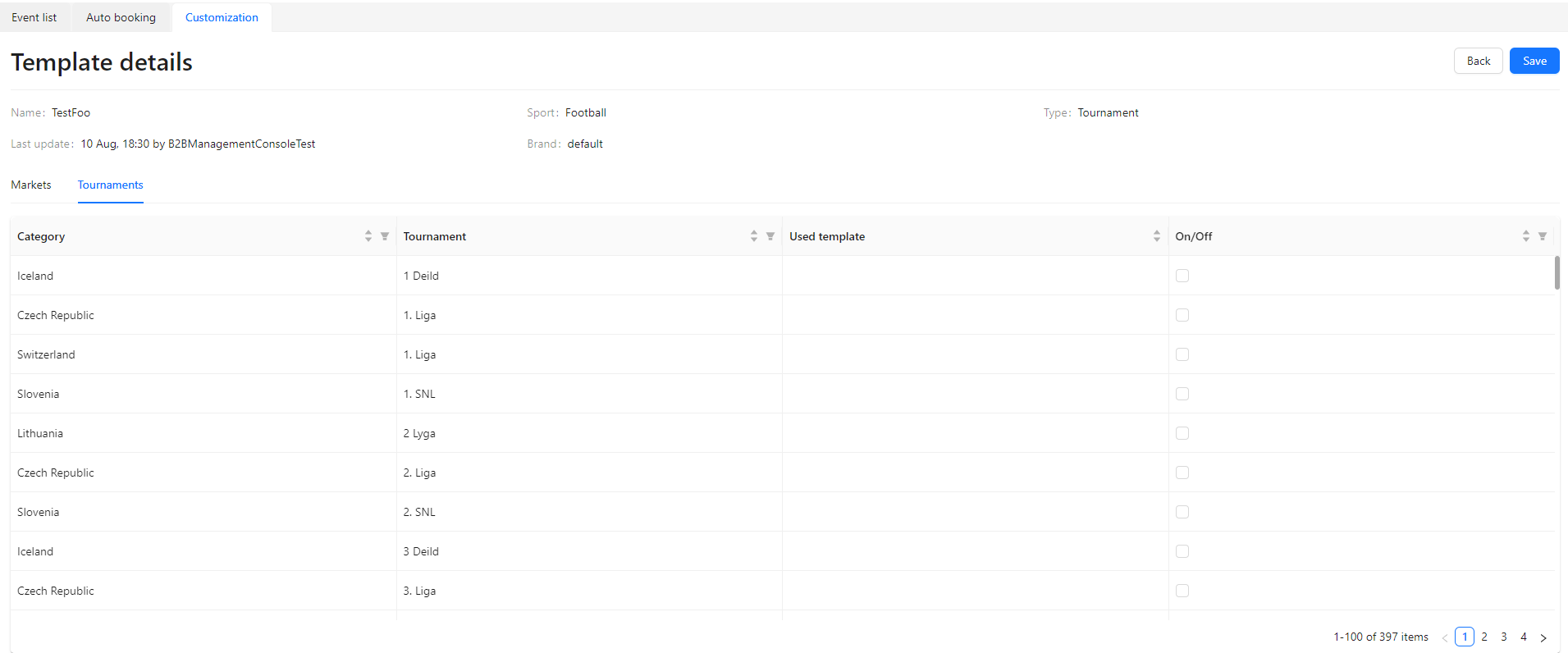
Including tournaments, to which customization template should be applied - is done at tab "Tournaments". List of tournaments while template creation will be displayed after user sets trading stage (In-play, Prematch, All).
User should set "On" to tournaments, which should be included into customization template. Some tournaments are disabled for including - as they are already included into another customization template (for this brand, sport and trading stage). Name of customization template, were tournament is assigned is mentioned in column "Used template".
So, if user needs to re-assign tournament to "new" customization template - this tournament should be excluded from "old" (actual) customization template
By clicking on template's name user can view details of each template and modify customization settings. Also template's details are available after pressing "Details" in context menu, invoked by button "..." in front of each template.
Customization settings are available at tab "Markets" of tournament's template: list of markets, values of margin, delays, limits are enabled to modify according to user's decision (details in chapter "Data available for customization"). All changes to template should be confirmed by user while saving.
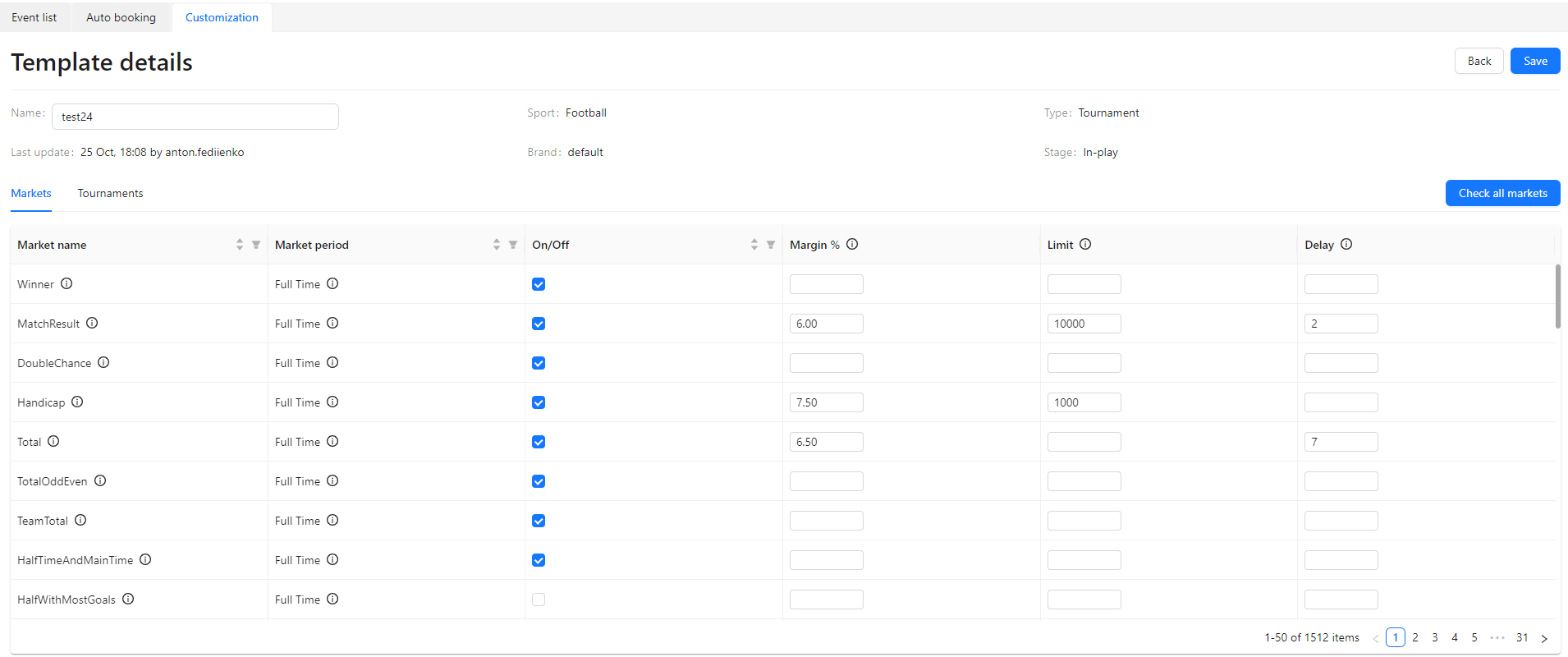
Settings of tournament's template are applied to all events of this tournament - if there are no other higher-priority templates, applied to event directly according to business rules ("Templates prioritization" chapter).
List of tournaments, to which tournament's template is already applied or could be linked - is available at tab "Tournaments".
User sets parameter "On/Off" in front of chosen tournament:
- "On": current tournament's template is assigned to this tournament. If "On" is disabled - then this tournament is already assigned to another template, so should be unlinked from it
- "Off": template is not applied to tournament
Thus, using this feature, user could apply customization template to list of tournament upon necessity (all changes should be confirmed while saving).
By default - all tournaments in the list have parameter "Off", so user should take decision to which tournaments customization template should be applied.
Tournament's template could be deleted by pressing "Delete" in context menu, invoked by button "..." in front of each template. System forces user to confirm this action.
Also for user's convenience, if there are several brands to operate - there is option to customize each brand separately by cloning tournament templates to other brands.
For this purpose:
1) to tick tournament templates from list, which has to be cloned to other brands. Cloning could be done either for 1 template, or for list of templates
2) to chose option "Clone" in context menu (for 1 chosen template) or right-up-corner menu for bulk cloning - invoked by pressing button "..."
3) to chose brand, to which template has to be cloned
4) after system confirmation that cloning was successfully fulfilled - to change templates parameters for new brand and stage, if necessary
Event templates
Are available at tab "Event templates" of Customization.
Event's templates could be used, if customization by special parameters is needed for some specific event(s).
Tab contains list of event's templates per chosen brand, specifying template's name, sport, trading stage, last update and count of events, customized by this template:
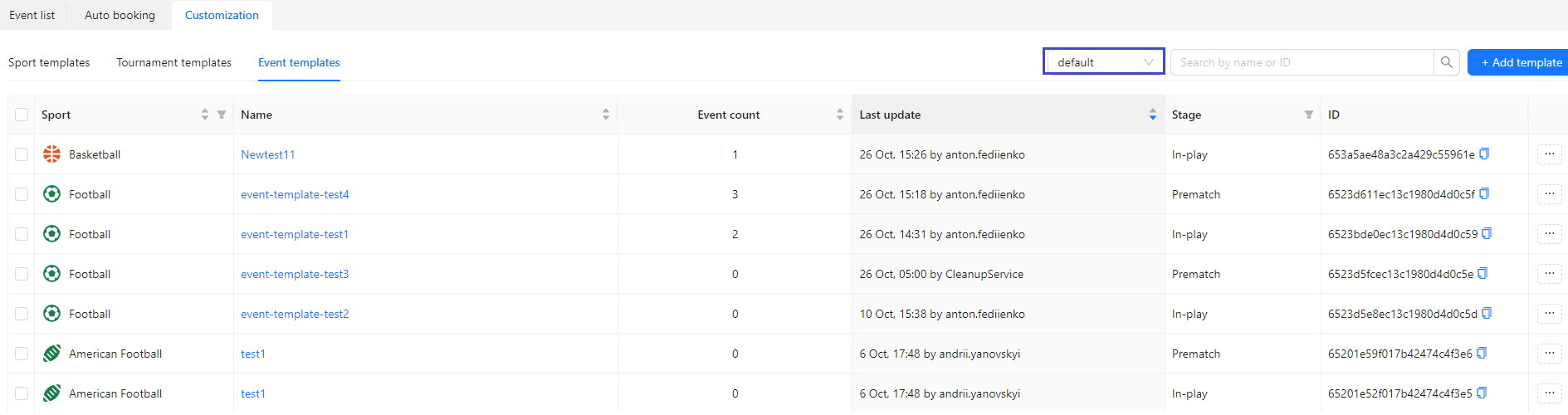
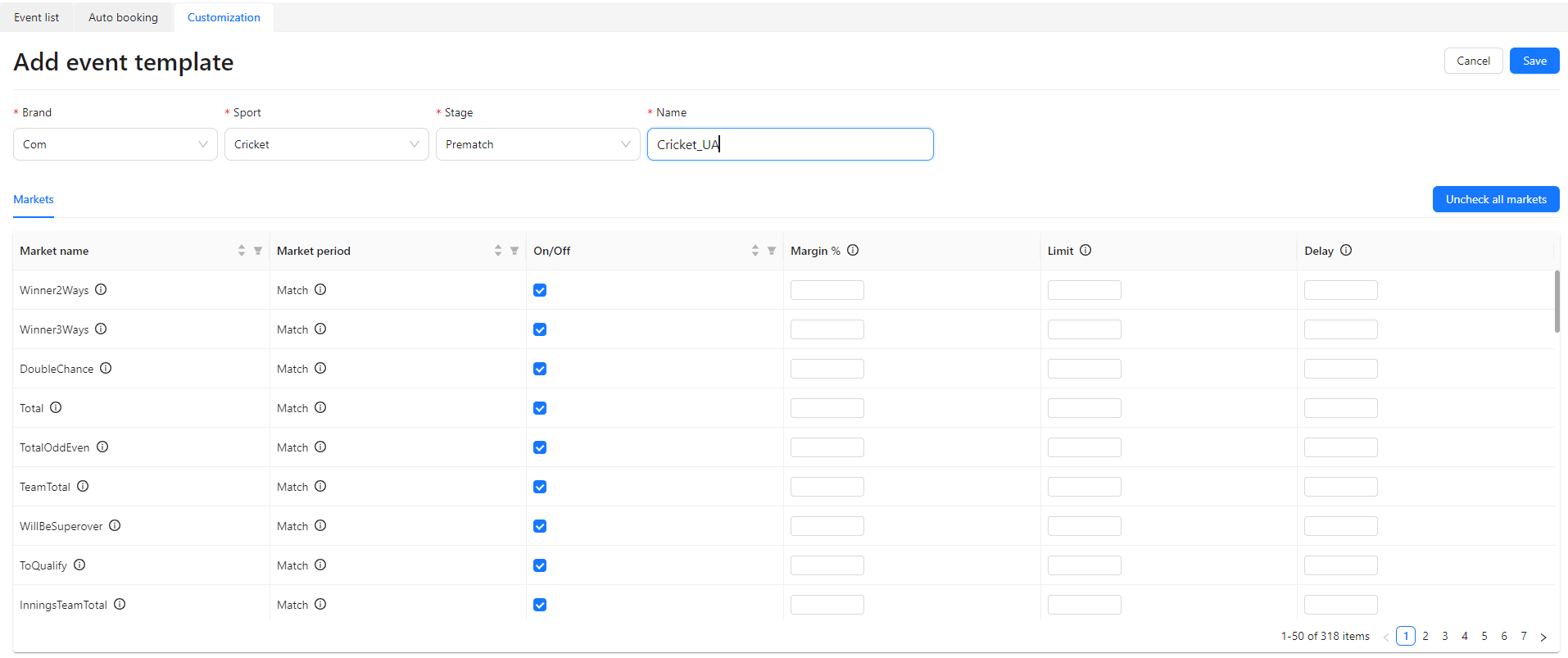
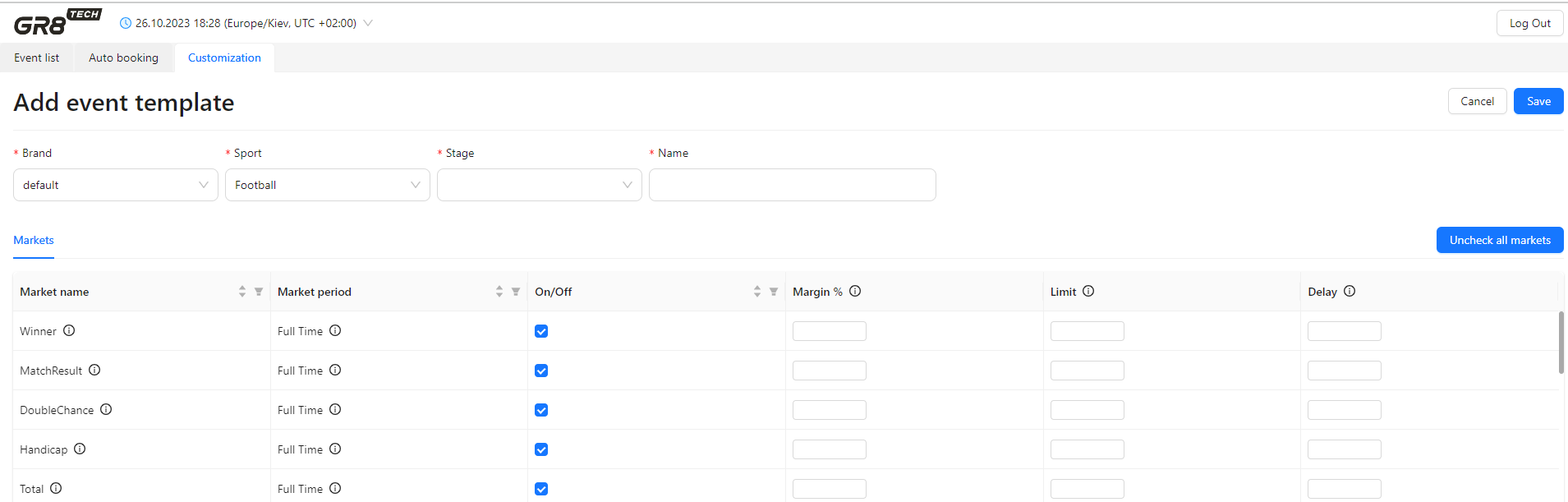
To create new event's template user should press "Add template" button and enter brand, sport, trading stage (In-play, Prematch) and name of template (it should be unique for sport+brand).
After that user sets up customization settings (list of markets, margin, delays, limits) and presses "Save".
By clicking on template's name in list of templates user can see details of each template and modify customization settings. Also template's details are available after pressing "Details" in context menu, invoked by button "..." in front of each template.
Customization settings are available at tab "Markets" of event's template - and list of markets, values of margin, delays, limits are enabled to modify according to user's decision (details in chapter "Data available for customization"). All changes to template should be confirmed by user while saving.
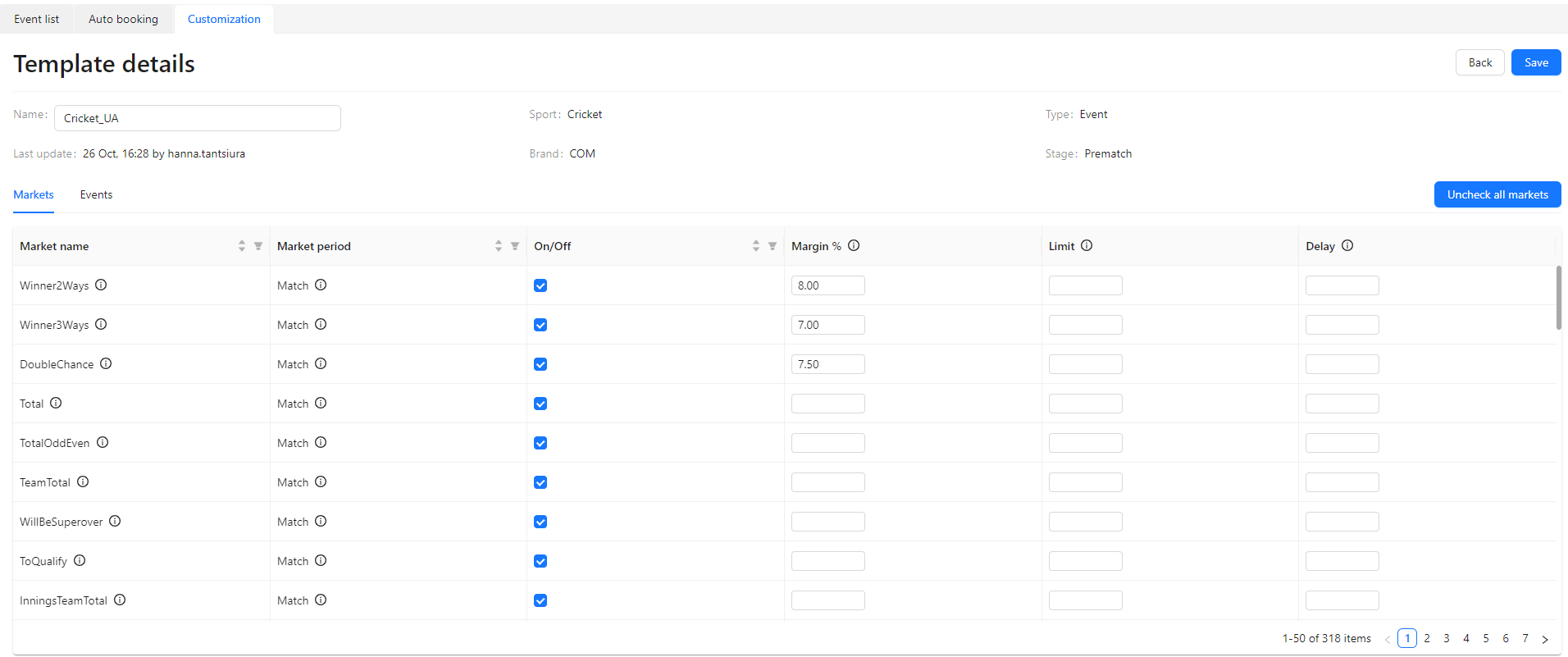
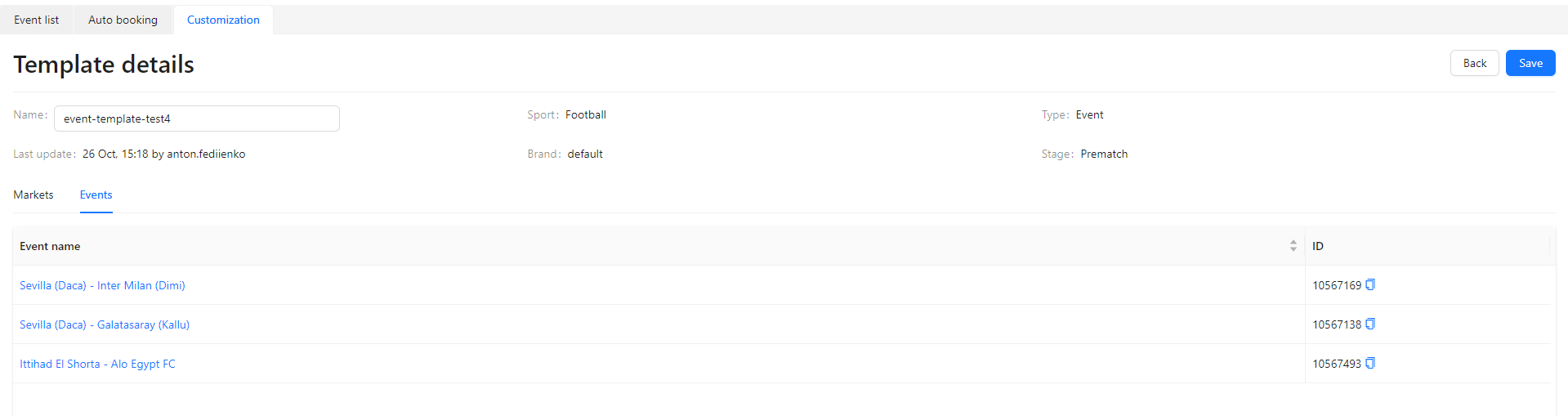
Tab "Events" contains list of events, with actual current customization template (events with assigned current template). List of events - is view only
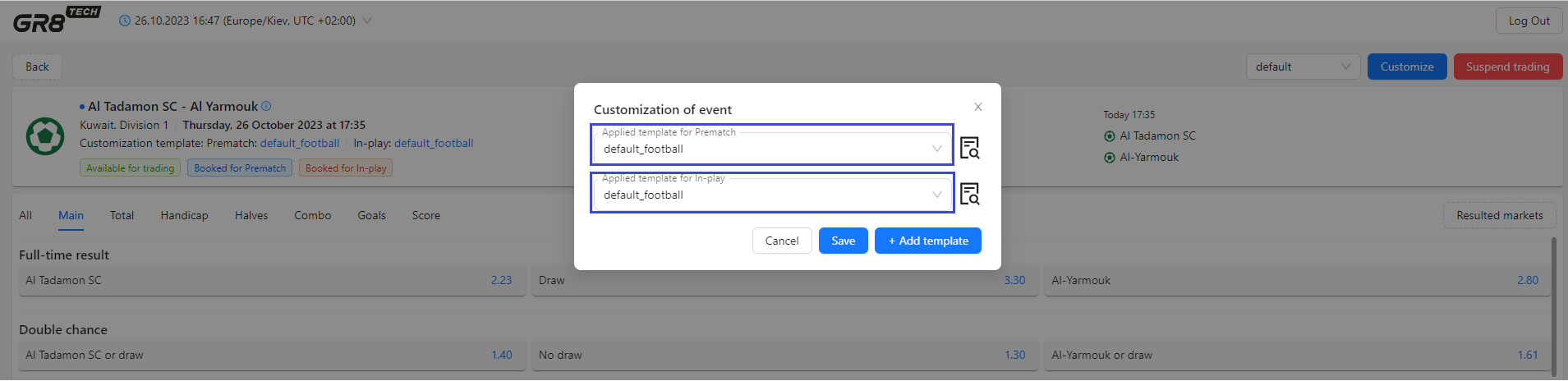
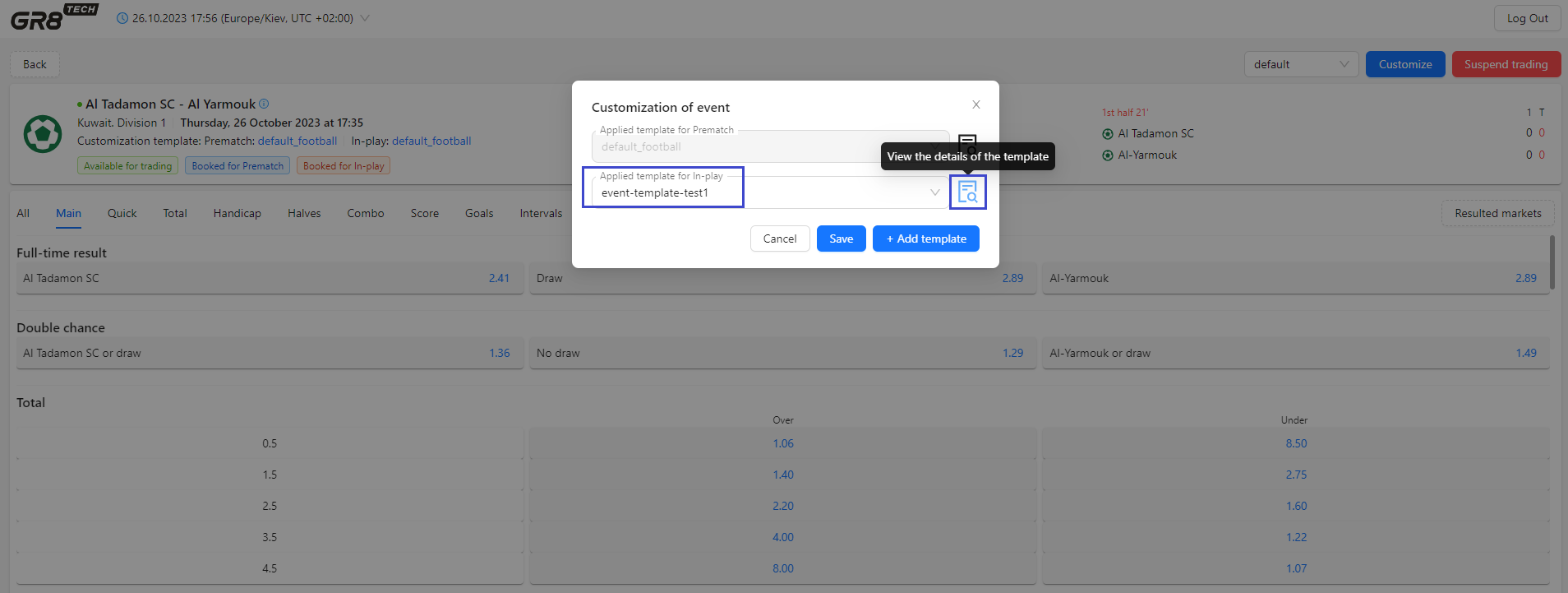
Appling event's template to event is done by pressing "Customization" of the Event View:

Modal window shows current actual templates, assigned to the event for each of trading stage (if any). If there is no event's customization template, applied to event for this stage - this field will contain default sport's template (which covers all events by this sport by default) or tournament's template name (if event belongs to this tournament) for respective trading stage (In-play and Prematch). Details of applying of tournament's or sport's template - chapter "Templates prioritization".
Currently this chosen event is customized by defaulted sport templates default_football for In-play and Prematch trading stages of the event. These default templates are applied for all football events, having no higher priority templates).
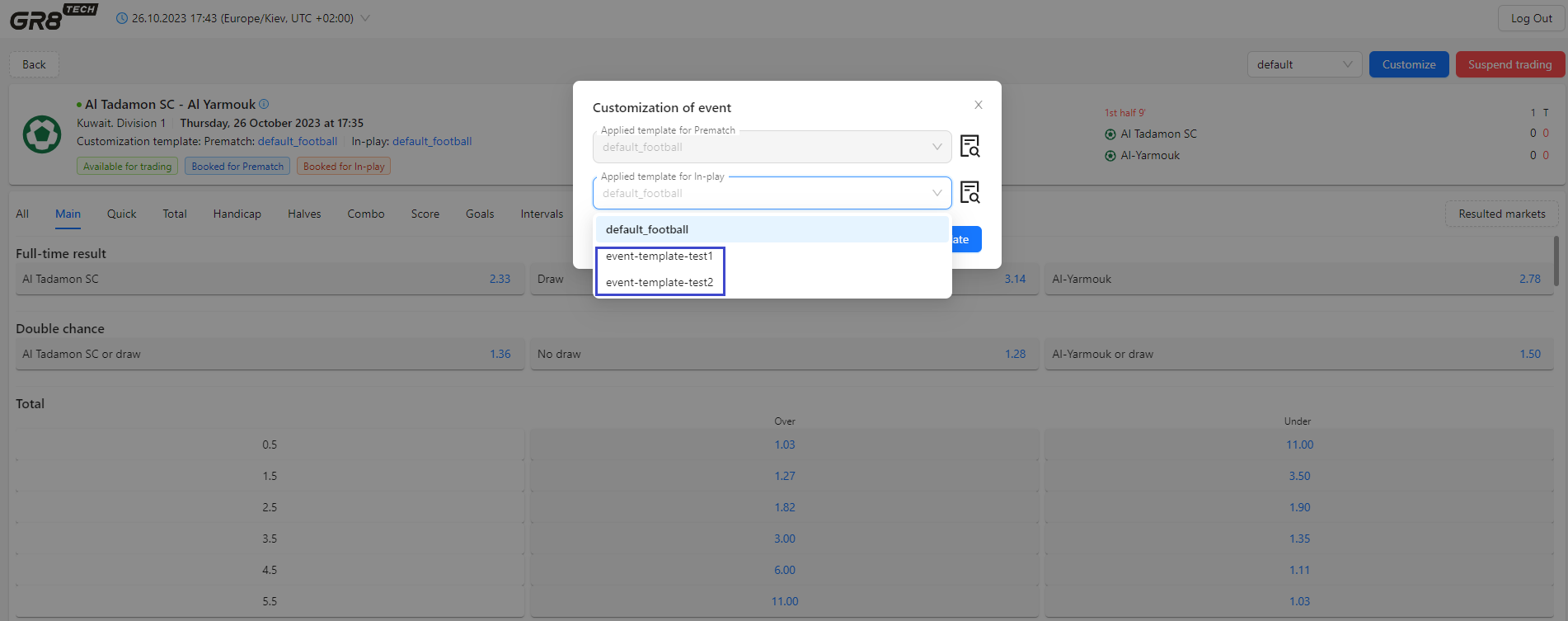
In the same time, list of templates for In-play stage contains event's templates event-template-test1 and event-template-test2, and each of them could be assigned for event to customize it for In-play (to apply customization settings from these will apply).
List of templates for Prematch stage is disabled, as event is already in live (match have being started).
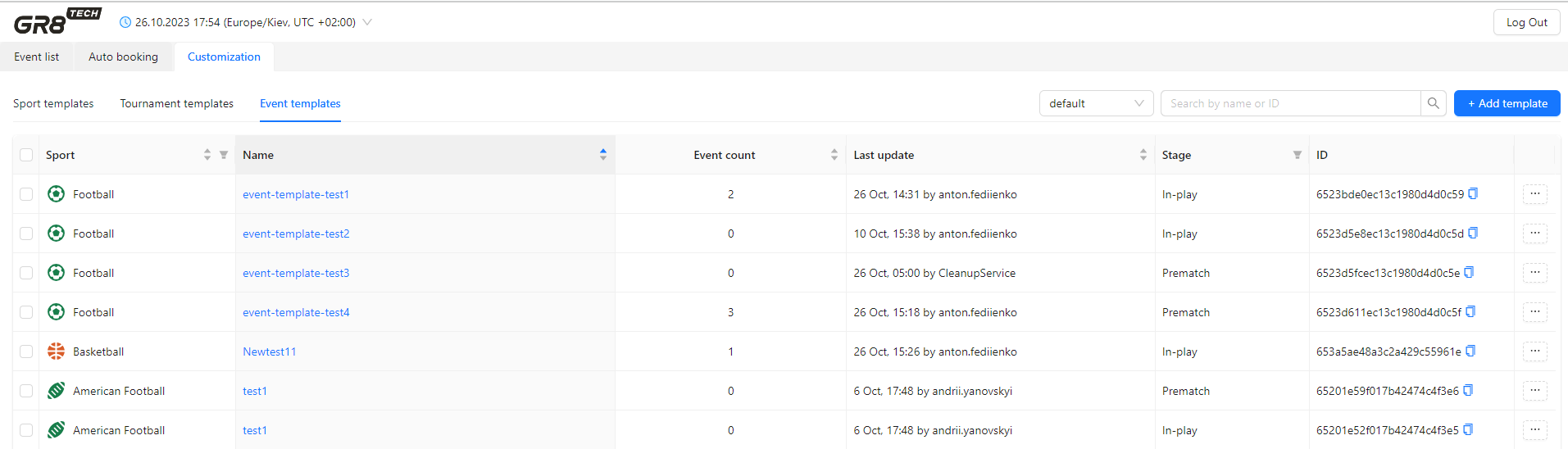
Both these templates event-template-test1 and event-template-test2 could be checked at Event templates list:
So fields "Applied template for Prematch" and "Applied template for In-play" at event's customization contain lists of already created event's templates for each trading stage respectively. Each of them could be be chosen by user - to change actual customization conditions.
If user chooses template from list - pressing to the special icon will redirect user to separate tab with displayed event's template's details.
Pressing "Save" will apply event's template to this event. As a result, at tab "Events" of the event's template will be added info about this linkage.
If there is no appropriate customization template for the event in the list - by pressing button "Add template" user will be redirected to event's template creation form.
Event's template could be deleted by pressing "Delete" in context menu, invoked by button "..." in front of each template. System forces user to confirm this action.
Also for user's convenience, if there are several brands to operate - there is option to customize each brand separately by cloning templates to other brands.
For this purpose:
1) to tick event template(s), which has to be cloned to other brands. Cloning could be done either for 1 template, or for list of templates
2) to chose option "Clone" in context menu (for 1 chosen template) or right-up-corner menu for bulk cloning
3) to chose brand, to which template has to be cloned
4) after system confirmation that cloning was successfully fulfilled - to change templates parameters for new brand if necessary
Templates prioritization
For flexible and convenient customization management - templates have following priority of applying: Event template (the highest priority) → Tournament template (lower priority) → Sport template (the lowest priority).
Thus, customization settings applied for specific event are defined by template of highest priority assigned (considering tournament and sport of event).
At the moment of time, the only one customization template for In-play stage, and only one template for Prematch stage could be applied to event (customized parameters assigned to events trading stage are defined by only one template according to priority).
Actual template, assigned to event for specific trading stage In-play/Prematch (and all respective template's customization settings) - is defined by following consequent rules:
1) is there any customization event template In-play / Prematch, applied to chosen event?
- if yes: customization settings of this event template for this stage are applied (the highest priority)
- if no: needs to check tournament, to which event belongs (whether there is tournament template for this trading stage)
2) is there any customization tournament template In-play / Prematch, applied to the tournament of the event?
- if yes: customization settings of this tournament template are applied to event within this tournament (lower priority) for this trading stage
- if no: customization settings of sport (to which event belongs ) template of specific trading stage are applied to event (the lowest priority)